An LLM call may work well during testing but fail when real users depend on it. A provider might be temporarily unavailable, take too long to respond, or limit how many requests your application can send.
If your application relies on that provider alone, users may see failed requests even when another provider could handle the task.
The solution is to decide in advance what your application should do when a call fails. Sometimes it should try the same provider again. Sometimes it should switch to a backup. And sometimes it should stop because the request itself needs to be fixed.
This guide explains how to make those decisions in a way that is practical for a production application.
1. Understand Retries and Fallback
Retries and fallback both help an application recover from failures, but they do different jobs.
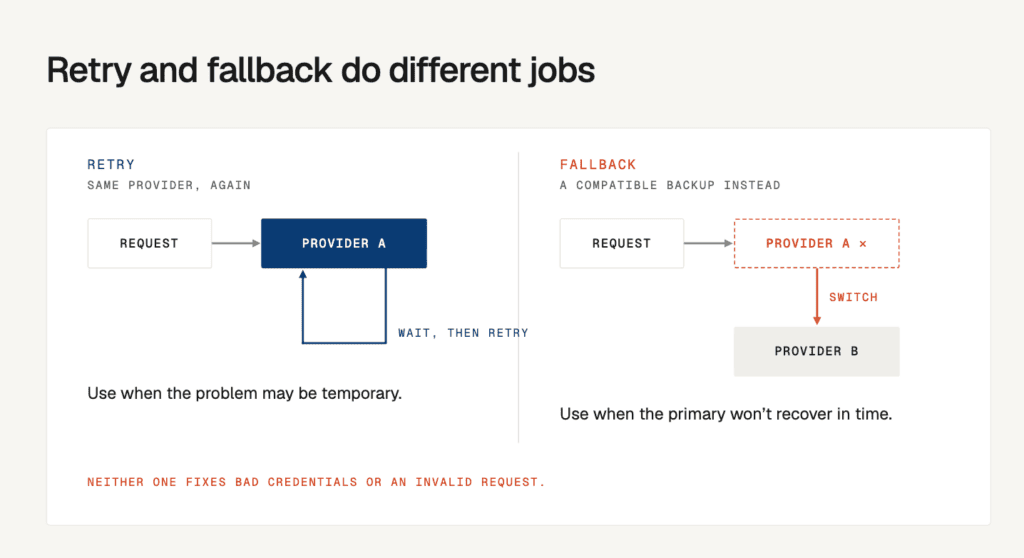
- Retry means sending the request to the same provider again. Use it when the problem may be temporary.
- Fallback means sending the request to another compatible model or provider. Use it when the primary provider is unlikely to recover quickly enough.
For example, if a request fails because of a brief network issue, trying again may work. If the provider is down, a backup may be the better choice. If the request contains an invalid parameter, neither retrying nor switching providers will automatically fix it.
What Should Happen When a Request Fails?
| What happened | What it means | What your application should do |
| A brief network problem | The connection may recover | Retry a limited number of times |
| The provider is busy or limiting requests | Too many requests may have arrived in a short period | Wait before retrying, or use a backup if appropriate |
| The provider returns a server error | The provider may be experiencing a temporary problem | Retry briefly, then consider fallback |
| The request takes too long | The response may arrive after the user has waited too long | Retry only if enough time remains; otherwise try a backup or stop |
| The API key or permissions are wrong | The application may not be authorized to make the request | Stop and fix the configuration |
| The request uses an invalid parameter | The provider cannot process the request as written | Fix the request before trying again |
The first step is to identify what went wrong. Your application can then choose a response that matches the problem.
2. Decide Which Errors Can Be Recovered From
Not every error should trigger another attempt. Retrying a temporary network failure can help, but repeatedly sending a request with invalid credentials only wastes time.
A simple starting policy is:

What Does HTTP 429 Mean?
HTTP 429 means the provider is limiting requests, often because the application has sent too many in a short period. The provider may include a Retry-After value in its response. This tells the application how long to wait before trying again.
For example, if the provider asks you to wait two seconds, do not immediately send the same request again. Wait as instructed, and retry only if the overall request deadline still allows it.
If a backup provider is available and supports the same task, your application may use that route instead. However, a backup will not solve every rate-limit problem. If both providers share a quota, account, or underlying dependency, switching may not help.
3. Choose a Backup That Can Do the Same Job
Choose your backup provider before an outage happens. Do not wait until the primary fails to discover that the alternative cannot handle the request.

Two models may both accept text but differ in important ways. One may support tool calling or structured JSON output, while another may not. They may also have different context limits, image support, or provider-specific settings.
Before adding a provider to your fallback list, check that it supports the features your application needs.
Keep the Request Consistent
Your application should preserve the user’s original task when switching providers. Do not silently remove important context, drop a required tool, or change the expected output just to make the backup work.
A shared provider adapter can help. It gives your application a consistent way to send requests and handle responses, while still allowing for provider-specific differences.
If a backup cannot support a required feature, the application should reject it as an option rather than return an incomplete result.
A basic recovery path looks like this:
Send request → Try primary provider → Retry if appropriate → Try compatible backup if needed → Return result or clear error
Model selection and failure recovery are related but separate decisions. Routing chooses a model based on factors such as task, cost, or quality. Fallback responds when the chosen route fails.
Lyzr’s guides to Auto Model Routing and Small Model Routing explain how model selection can support different workload requirements.
4. Limit Retries and Wait Between Attempts
Repeatedly retrying a failing provider can make the problem worse. If hundreds of requests fail at once and all retry immediately, they can hit the provider together and create even more failures.

Instead, set a small retry limit and increase the wait between attempts. This approach is called exponential backoff.
For example, your application might wait about 200 milliseconds before the first retry, 400 milliseconds before the next, and 800 milliseconds after that. Add a small random variation, known as jitter, so many requests do not all retry at exactly the same time.
These are example values, not settings that work for every application.
Rules for Safe Retries
- Set a maximum number of attempts.
- Follow the provider’s Retry-After instruction when it supplies one.
- Include retry delays and backup attempts in the overall time limit.
- Avoid repeating actions that could create duplicate side effects unless you have a safe way to prevent duplicates.
A user waiting for an answer may need a quick retry followed by a backup. A background job may be able to wait longer. Choose retry settings based on what your application can reasonably ask users to wait for.
5. Set a Time Limit for the Whole Request
Each API call can have its own timeout, but your application also needs a deadline for the complete operation. That deadline should include the primary attempt, any waiting time, retries, and fallback attempts.

For example, if a user-facing request has a three-second limit, the application cannot spend three seconds on the primary provider and then start a fresh three-second wait for the backup.
It needs to make the recovery decision while there is still time to return a useful response.
Check These Five Things Before Using a Backup
| Check | Question to ask |
| Capability | Can the backup handle the required context, tools, input type, and output format? |
| Availability | Is it likely to be available, and does it have enough capacity? |
| Cost | Could switching increase spending unexpectedly? |
| Quality | Does it meet the minimum quality requirements for this task? |
| Privacy | Is the application allowed to send this input to that provider? |
A successful API response is not always a successful task. If your application requires valid JSON or specific fields, validate the response before returning it.
If the backup returns an unusable result, return a controlled error or offer another path instead of presenting it as a valid answer.
6. Stop Sending Requests to a Provider That Keeps Failing
A few retries can help with a temporary issue. They are less useful when a provider continues to fail.
A circuit breaker helps prevent your application from repeatedly calling a provider that appears unhealthy.
Conclusion
Reliable LLM applications need a clear recovery strategy for when providers fail. Use retries for temporary errors, switch to a compatible backup when necessary, and set limits on attempts and total response time.
Add circuit breakers, validate fallback responses, and monitor failures across providers to prevent small disruptions from affecting the entire application.
As your application grows, managing these decisions across multiple models becomes more complex.
Lyzr helps teams build and manage production-ready AI agents, making it worth evaluating as part of your approach to reliable, multi-provider AI applications.
Book A Demo: Click Here
Join our Slack: Click Here
Link to our GitHub: Click Here