As an AI application serves more users, requests may start returning 429 Too Many Requests. With multiple large language model (LLM) providers, diagnosis gets harder because each provider can enforce different limits and return different error details.
Do not retry every failure or immediately switch models. Identify the cause, then recover while respecting provider limits and avoiding duplicate work.
What Does a 429 Error Mean in an LLM Application?
An HTTP 429 response means the request was rejected because a limit was reached. With LLM APIs, that limit might apply to requests, tokens, usage, or spending. The exact cause matters because not every 429 will resolve if you simply wait a few seconds.
For example, a sudden burst of requests may temporarily exceed a requests-per-minute limit. A large prompt may exhaust a token budget sooner than expected. A billing or usage cap may require an account change rather than another retry.
Before changing providers or adding retries, inspect the response body and headers. Treat the status code as the starting point of your investigation, not the full diagnosis.
Why Handling 429 Errors Across Multiple Providers Is Different
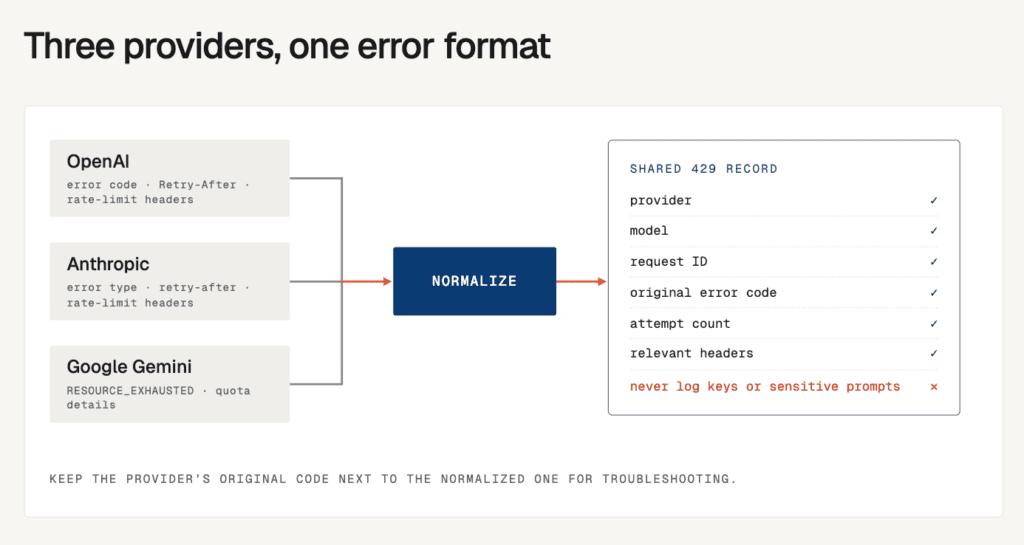
Each provider has its own limits, error details, and headers. Your application should account for those differences without scattering provider-specific checks throughout product code.
| Provider | What to inspect | Practical handling |
| OpenAI | Error code and message, Retry-After when present, and rate-limit headers | Respect the retry delay; distinguish temporary rate limits from exhausted credits or usage limits |
| Anthropic Claude | Error type and message, retry-after, and rate-limit headers where available | Wait for the specified delay; check whether the issue is a rate limit, acceleration limit, or spend cap |
| Google Gemini | Error details, including RESOURCE_EXHAUSTED, and applicable quota or rate-limit information | Use exponential backoff for transient limits; check whether the exhausted quota is per-minute, daily, or spend-based |
Header availability and behavior vary by endpoint, model, account tier, and SDK version. Normalize errors into a shared internal format, but preserve the original provider code and response details for troubleshooting.
Step 1: Identify Which Limit Was Reached
Classify the error before retrying. Distinguish a temporary throttle from a limit that requires a configuration or account change.

A 429 may be tied to a model, project, organization budget, or usage window. Log provider, model, request ID, error code, attempt count, status, and relevant headers, but never keys or sensitive prompt content.
Step 2: Retry Safely With Backoff and Jitter
For a temporary rate limit, wait rather than immediately resending the request.

Respect Retry-After first
If the response includes a valid Retry-After value, treat it as the minimum wait before retrying. Do not retry sooner just because your application’s default delay is shorter.
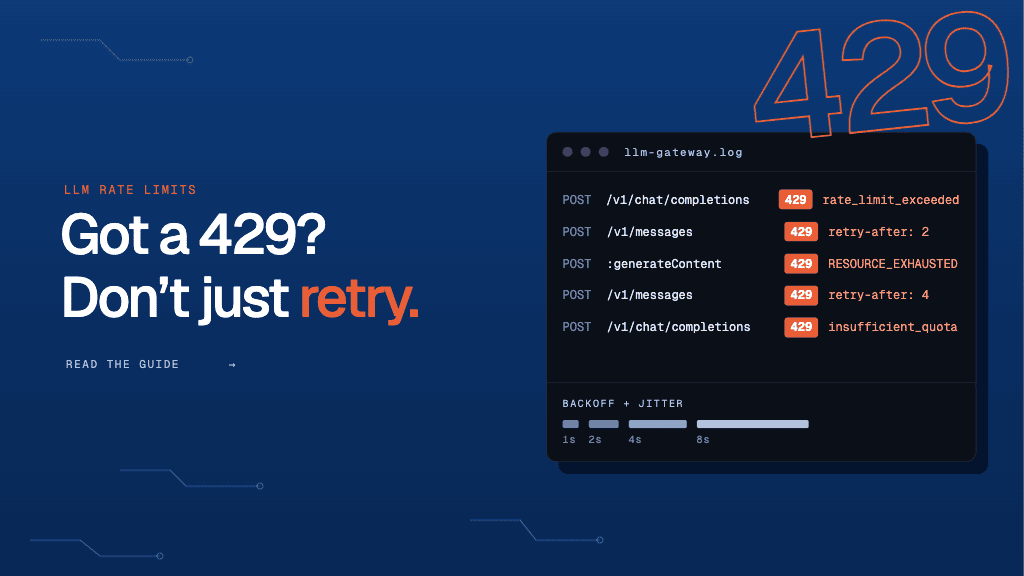
If the header is missing or unusable, use exponential backoff with jitter. For example, the delay can increase after each failed attempt, while a small random component prevents many workers from retrying at exactly the same time.
For example, a policy might start at 1 second, then increase to 2, 4, and 8 seconds. These are illustrative values, not universal requirements. Add jitter, cap the delay, and set a retry count and total deadline. If the request cannot succeed in time, return a controlled response or queue eligible work.
Avoid retry loops inside retry loops

Official SDKs may already retry transient failures. An additional application retry loop can multiply provider calls. Choose one retry owner or define a combined retry budget. Failed requests may still count toward limits, so repeated requests can worsen the problem.
Step 3: Add a Shared Rate-Limit Layer

When several parts of an application call LLM providers, local retry logic is not enough. A shared rate-limit layer should coordinate:
- Provider-aware limits: Track request and token budgets by provider and model.
- Concurrency control: Limit in-flight requests and queue excess work.
- Retry scheduling: Record the next eligible retry time so workers do not retry independently.
- Observability: Track 429 frequency, retry success, queue depth, latency, and provider/model.
Use provider headers when available, but do not depend on them always being present. Maintain conservative local estimates and adjust them using observed responses. In agentic applications, one user action may trigger several model and tool calls, so a shared budget prevents those steps from creating a burst.
Step 4: Decide When to Fail Over to Another LLM Provider
Failover can protect availability, but it should not happen automatically for every 429. A billing cap or exhausted quota needs attention, and an alternate provider may also be near its limit. Use a fallback only after classifying the error and confirming the alternate provider is healthy and suitable.

Check that the alternate model supports the required context length, tools, structured output, and safety requirements. Test output quality as well as availability. If a request triggers an external action, make it idempotent or verify its status before replaying it.
A Quick Decision Checklist for Your 429 Handler
Use this checklist to review your implementation.
- Do we inspect the provider error body instead of relying on status code alone?
- Do we honor Retry-After when it is valid and present?
- Do we use exponential backoff with jitter when no usable delay is supplied?
- Are retry attempts and total elapsed time capped across both the SDK and application?
- Can we tell rate limits apart from quota, credit, or spending limits?
- Do we coordinate concurrency across workers instead of letting each worker retry independently?
- Is provider failover limited to approved, compatible alternatives?
- Do we monitor 429 rates, retry success, latency, and provider-specific failures?
If several answers are no, fix classification and retry ownership first.
How Lyzr Fits Into Multi-Provider AI Applications
For AI agents, one rate-limited step can interrupt a multi-step task. A resilient system needs control over model calls, retries, routing, and observability.
Lyzr’s enterprise AI agent approach may be relevant for teams evaluating these workflows. Assess provider support, routing control, monitoring, security, and deployment needs. Prevent temporary limits from becoming retry storms or production incidents.
Frequently Asked Questions
1. Should I retry every 429 error?
No. Retry temporary limits with a bounded delay. Fix exhausted credits, spending caps, or account-level quotas instead of repeatedly sending the request.
2. Is exponential backoff enough to handle LLM rate limits?
It helps with transient throttling when combined with jitter and a retry limit. It cannot solve traffic bursts, duplicated retry loops, or persistent account-level limits on its own.
3. Should I switch providers as soon as one returns a 429?
No. Classify the error first. Use a fallback only if retrying will miss the deadline and the alternative has capacity and meets capability, cost, and safety requirements.
4. How do I prevent 429 errors across multiple LLM providers?
Use shared concurrency controls, track request and token budgets, queue bursts, follow provider retry guidance, and monitor errors by provider and model. Trim unnecessary prompt context and output limits.
5. Can a multi-provider setup guarantee that 429 errors will never happen?
No. Limits and capacity change. Multi-provider routing improves resilience when paired with backpressure, bounded retries, clear fallback rules, and monitoring.
Book A Demo: Click Here
Join our Slack: Click Here
Link to our GitHub: Click Here