Compliance teams have spent years getting better at finding problems.
AI has accelerated that progress. Systems can scan activity, flag policy violations, identify unusual behavior, summarize evidence, and surface risks faster than manual reviews ever could.
But detection is only the first part of compliance.
A high-risk event can sit in a queue for hours while someone decides what it means. A policy violation can be correctly identified but still require several manual steps before anyone acts. And when the same issue appears across hundreds of workflows, simply producing more alerts can make the operational problem worse.
That is where the conversation is shifting from AI that identifies compliance issues to agents that can take the next step.
The difference is not that one uses AI and the other does not. The difference is what happens after a risk is detected.
The Compliance Problem Is Not Finding the Alert
Consider a simple compliance event.
An employee uses an unapproved AI application to process an internal document.
A traditional compliance system might detect the application, identify the policy violation, assign a severity level, and create an alert.
That sounds useful—and it is.
But the alert does not resolve the problem.
Someone still needs to determine:
- What data was shared?
- Which employee or team was involved?
- Was the application approved for another use case?
- Which policy applies?
- Is the activity still happening?
- Does access need to be restricted?
- Does the security or legal team need to be involved?
- What evidence needs to be preserved?
- Was the issue actually resolved?
The workflow therefore looks something like this:
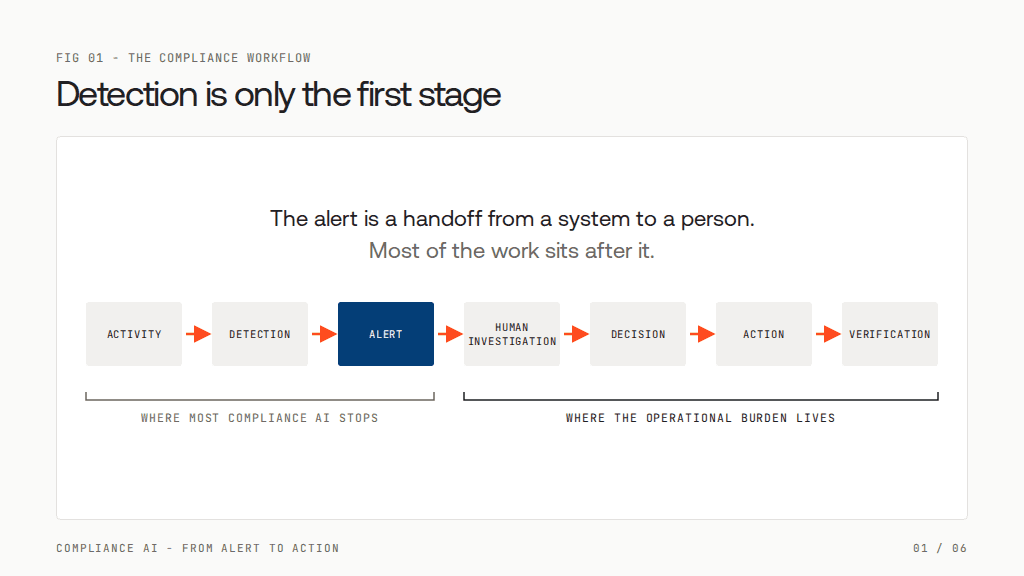
Most compliance AI focuses heavily on the first three stages.
The operational burden lives in the stages that follow.
| Compliance stage | What AI systems often do well | What still requires work |
| Detect | Identify suspicious or non-compliant activity | Establish whether the event is actually risky |
| Classify | Assign categories, severity, or policy labels | Apply business context |
| Alert | Notify the right team | Decide what should happen next |
| Investigate | Summarize available evidence | Correlate evidence across systems |
| Decide | Recommend an outcome | Approve or select the response |
| Remediate | Suggest an action | Execute the action safely |
| Verify | Report status | Confirm the issue is actually closed |
This gap matters because compliance is ultimately an action loop, not an alerting loop.
Why More Alerts Do Not Mean Better Compliance
It is tempting to assume that better detection automatically produces better compliance.
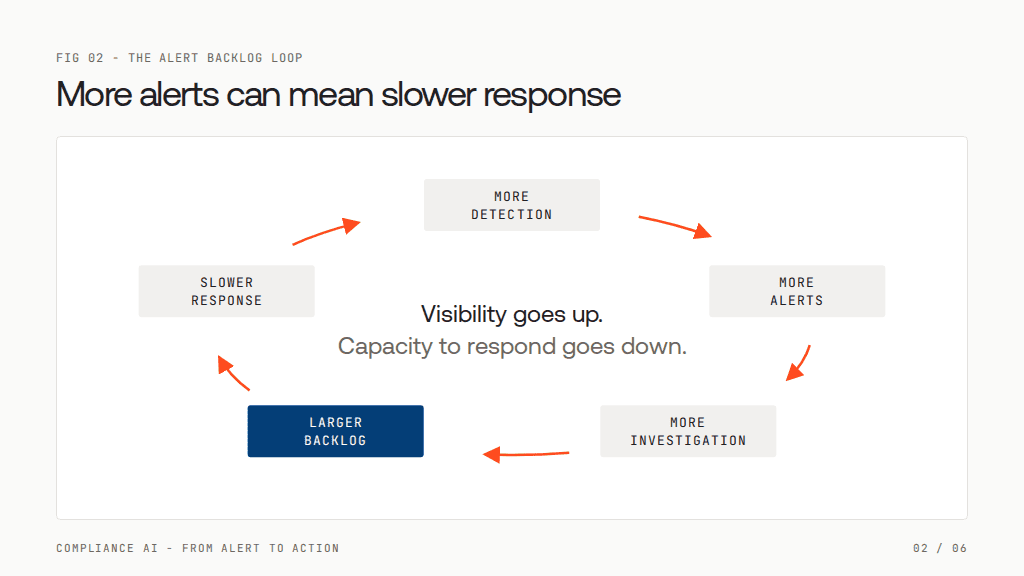
If a system can detect twice as many policy violations, it should theoretically give the compliance team better visibility.
But there is a limit.
When every detected issue becomes another item in a queue, the organization can end up with more visibility and less capacity to respond.
That creates a familiar pattern:
More detection → More alerts → More investigation → Larger backlog → Slower response
The problem becomes particularly difficult when AI systems operate across many applications, agents, models, data sources, and business workflows.
A compliance team may know that:
- a policy was violated,
- an application was accessed,
- sensitive data was involved,
- or an AI agent behaved outside its approved boundaries.
But knowing that something happened is different from changing what happens next.
The alert is a handoff
An alert usually hands the problem from a system to a person.
An agent can potentially carry the problem forward.
That distinction is important because the value of an agent is not simply that it can generate a more intelligent alert. Its value comes from being able to reason over context, use approved capabilities, take an action, and check the result.
What Happens Between an Alert and a Resolution?
Before looking at agents, it helps to break the compliance response into the work that usually happens after detection.
Take an example involving an AI agent that accesses a data source it should not have accessed.
A useful response might require seven steps:
- Understand the event — What happened?
- Establish context — Which agent, user, system, data source, and policy were involved?
- Assess risk — Is this a real violation or an allowed exception?
- Determine the response — Should the activity be blocked, restricted, escalated, or monitored?
- Take action — Apply the appropriate control.
- Record evidence — Capture what happened and why the action was taken.
- Verify — Confirm that the risky behavior has stopped or the issue has been resolved.
This is where compliance starts to look less like a monitoring problem and more like a workflow problem.
| Step | Example question | Typical output |
| Understand | What happened? | Event summary |
| Contextualize | Who or what was involved? | Identity, system, data, and policy context |
| Assess | How risky is it? | Risk classification |
| Decide | What should happen? | Response recommendation |
| Act | What control should be applied? | Block, revoke, quarantine, restrict, escalate |
| Record | What evidence supports the decision? | Audit trail |
| Verify | Did the response work? | Resolution status |
A compliance system that stops at step one or two still leaves most of the workflow untouched.
Where Compliance AI Typically Stops
Most compliance AI has been designed around visibility and prioritization.
That makes sense. Compliance teams first need to know what is happening before they can control it.
Common capabilities include:
| Capability | Purpose |
| Policy monitoring | Detect activity that may violate a policy |
| Anomaly detection | Identify behavior that deviates from expected patterns |
| Risk scoring | Prioritize events by severity |
| Classification | Categorize incidents and policy violations |
| Evidence summarization | Reduce the time needed to understand an event |
| Alerting | Route issues to compliance, security, or operations teams |
| Reporting | Produce records for audits and reviews |
These capabilities reduce the amount of manual work required to find and understand a problem.
But they do not necessarily reduce the work required to resolve it.
That distinction becomes more important as AI systems become capable of taking actions themselves.
If an enterprise has hundreds of AI agents interacting with internal systems, the compliance question is no longer only:
“Can we detect when an agent violates policy?”
It becomes:
“What happens automatically when it does?”
An Agent Changes the Workflow After Detection
An agent can sit on top of the detection layer and coordinate what happens next.
Instead of treating an alert as the end of an AI workflow, the alert becomes an input to another process.
This does not mean every compliance decision should be automated.
In fact, the opposite is often true.
The goal is to automate the repeatable operational work around a decision, while keeping high-impact decisions under appropriate human control.
That creates a more useful division of responsibility:
| Responsibility | Human | Agent |
| Define policy | ✓ | |
| Set risk thresholds | ✓ | |
| Approve high-impact actions | ✓ | |
| Gather evidence | ✓ | |
| Correlate events | ✓ | |
| Check policies | ✓ | |
| Prepare investigation summary | ✓ | |
| Execute approved low-risk actions | ✓ | |
| Escalate exceptions | ✓ | ✓ |
| Maintain audit trail | ✓ | ✓ |
| Verify remediation | ✓ |
The agent is not replacing the compliance function.
It is reducing the amount of repetitive work between “we found something” and “we know what happened and what to do about it.”
From Alert Handling to Compliance Resolution
The difference becomes clearer when the same event is handled in two different ways.
Traditional alert-driven workflow
An unapproved AI application is detected processing sensitive business information.
The system:
- Detects the application.
- Creates an alert.
- Assigns a severity.
- Sends the alert to a reviewer.
The reviewer then:
- Checks the employee’s identity.
- Investigates what information was involved.
- Checks whether the application has an approved exception.
- Reviews relevant policy.
- Determines the appropriate response.
- Coordinates with IT or security.
- Records the outcome.
- Checks whether the activity continues.
The detection system did its job.
But most of the compliance workflow still happened outside it.
Agent-assisted workflow
The same event is detected.
The agent can:
- Identify the user, application, and relevant activity.
- Retrieve the applicable policy.
- Correlate the event with related activity.
- Determine whether an approved exception exists.
- Classify the event against predefined risk rules.
- Recommend or execute an approved response.
- Create an evidence record.
- Monitor for continued activity.
- Escalate when the event falls outside its authority.
The key difference is not the quality of the initial alert.
It is the number of steps that happen after the alert without requiring someone to manually coordinate them.
The Agent Needs Context Before It Acts
Automation becomes dangerous when an agent acts on incomplete information.
A compliance agent cannot simply see:
“Sensitive data detected.”
and immediately block an application.
It needs context.
Was the data actually sensitive? Was the application approved for this team? Is there a temporary exception? Is the user authorized? Is the behavior part of a known business workflow? Has the same event happened repeatedly?
This is why effective compliance agents need access to multiple sources of context.
| Context | What it tells the agent |
| Identity | Who is performing the action? |
| Application | Which system or AI application is involved? |
| Agent identity | Which agent initiated the activity? |
| Data classification | What type of information is involved? |
| Policy | Which rules apply? |
| Permissions | What is the actor allowed to do? |
| History | Has similar activity happened before? |
| Exceptions | Is the activity explicitly permitted? |
| Environment | Where is the action taking place? |
| Previous actions | Has a control already been applied? |
This context is what separates a useful automated response from a blunt automated reaction.
The agent first needs to understand the situation. Only then should it determine what it is allowed to do.
Not Every Compliance Event Should Be Automated
One of the biggest mistakes in compliance automation is treating every alert as an opportunity for automatic remediation.
Some events are low-risk and repetitive.
Others involve legal, financial, privacy, security, or regulatory consequences.
The response should reflect that difference.
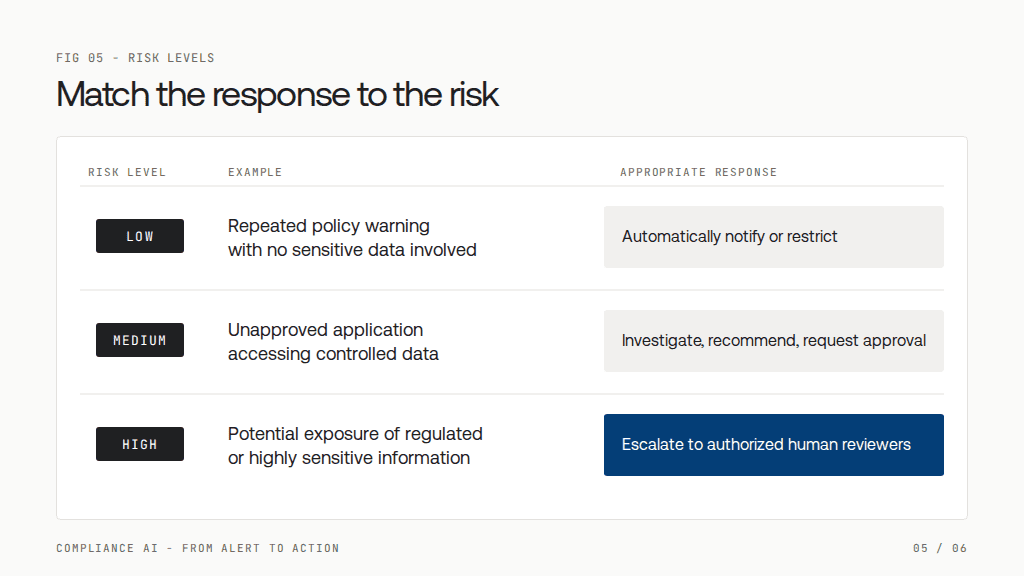
A practical model is to separate events into three levels:
| Risk level | Example | Appropriate response |
| Low | Repeated policy warning with no sensitive data involved | Automatically notify or restrict |
| Medium | Unapproved application accessing controlled data | Investigate, recommend action, request approval |
| High | Potential exposure of regulated or highly sensitive information | Escalate to authorized human reviewers |
This is where policy-driven agent behavior becomes important.
Instead of giving an agent unrestricted authority, organizations can define:
- what the agent can observe,
- what it can recommend,
- what it can execute,
- what requires approval,
- and what must always be escalated.
That creates a controlled path from detection to action.
The Real Shift: From Alerts to Action Loops
The broader change is not really about replacing alerts.
Alerts remain useful. Compliance teams still need visibility, prioritization, and human oversight.
The shift is from a one-way model:
Event → Alert → Human
to a closed operational loop:
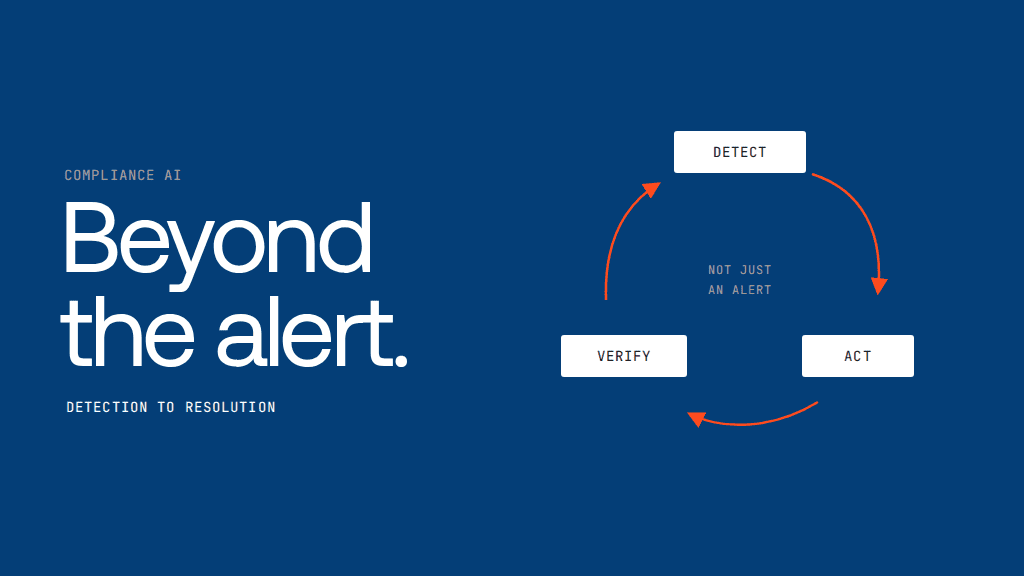
Event → Detect → Understand → Decide → Act → Verify
That final step—verification—is easy to overlook.
An action is not the same as a resolution.
If an agent blocks an application but the same user immediately switches to another unapproved application, the original action did not solve the underlying problem.
An agent therefore needs to be able to observe the outcome of its own actions.
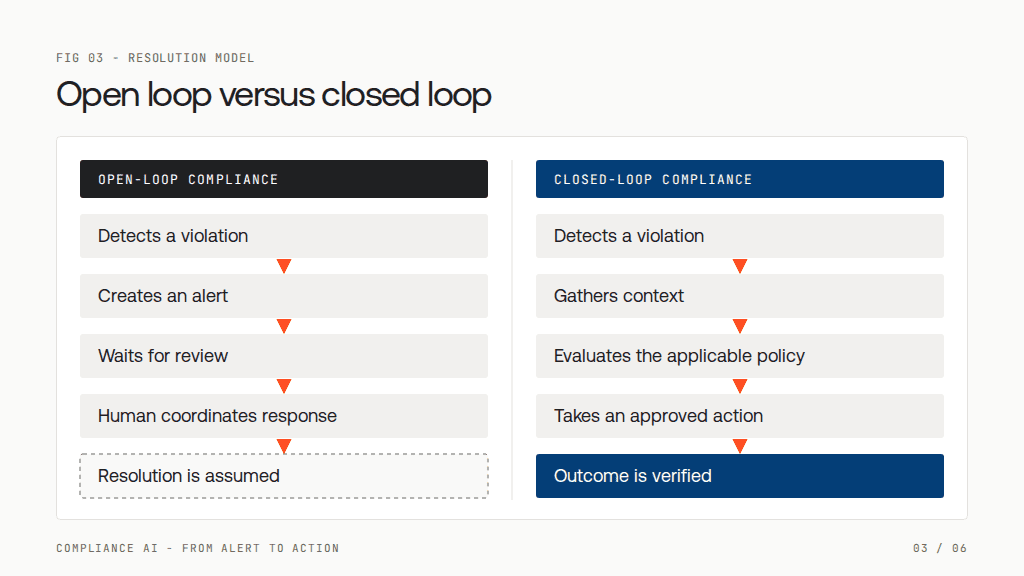
This is the difference between automating detection and automating a compliance process.
What Good Compliance Agent Architecture Looks Like
An agent that can act on compliance events needs more than a model.
It needs a controlled operating environment.
A useful architecture separates five layers:
1. Detection
This is where events enter the workflow.
Signals can come from applications, identity systems, data systems, agent activity, security controls, or other monitoring systems.
2. Context
The agent collects the information required to understand the event.
This includes identity, permissions, policies, historical activity, data classification, and relevant exceptions.
3. Reasoning
The agent evaluates the event against the organization’s policies and response rules.
The objective is not unrestricted reasoning. It is reasoning within defined boundaries.
4. Action
The agent uses approved capabilities to take the next step.
Depending on the risk level, that could mean notifying a user, restricting access, opening a case, requesting approval, escalating an issue, or triggering another workflow.
5. Verification and audit
The agent checks whether the action produced the intended outcome and records the evidence.
Together, these layers create a continuous loop:
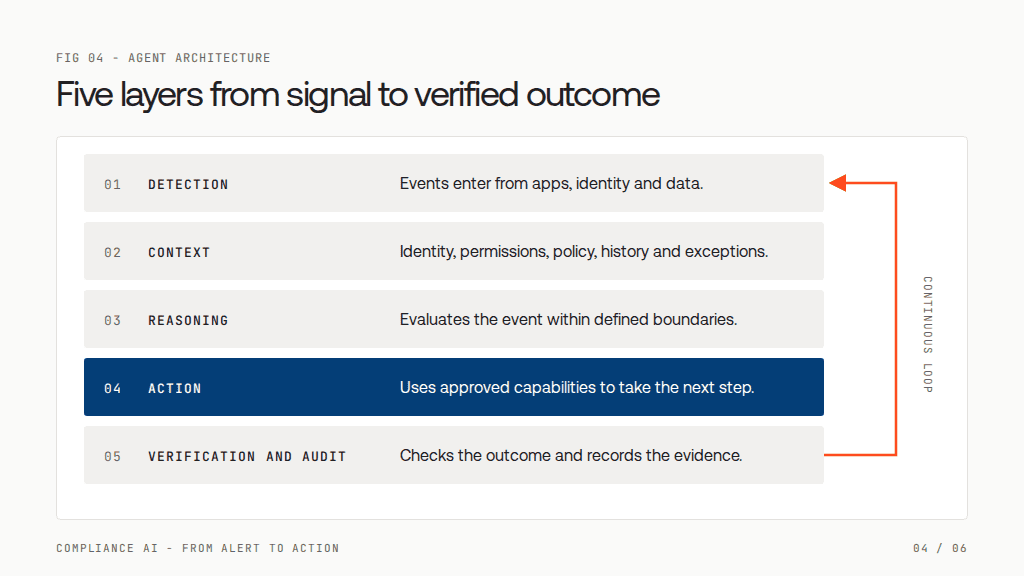
That loop is what turns compliance AI from a monitoring layer into an operational system.
What to Look for When Evaluating Compliance AI
The easiest way to evaluate a compliance AI system is to stop asking only what it can detect.
Ask what it can do after detection.
| Question | Alert-focused system | Agent-based approach |
| Can it detect violations? | Yes | Yes |
| Can it explain why an event is risky? | Often | Yes, with contextual reasoning |
| Can it gather evidence across systems? | Sometimes | Yes, when connected to approved sources |
| Can it determine the next step? | Usually recommends | Can reason within defined policies |
| Can it take action? | Limited | Yes, within configured permissions |
| Can it request human approval? | Often through workflow | Yes |
| Can it verify remediation? | Limited | Yes |
| Can it maintain an action trail? | Yes | Yes |
| Can it escalate exceptions? | Yes | Yes |
| Can it operate continuously? | Monitoring-oriented | Monitoring plus response |
The most important question is therefore not:
“How intelligent is the compliance AI?”
It is:
“How much of the compliance response can it safely carry from detection to resolution?”
The Goal Is Not Fewer Alerts. It Is Fewer Unresolved Alerts.
Compliance teams will always need alerts.
The real problem is the distance between an alert being created and the issue being resolved.
AI has already made the first part of that journey faster: finding anomalies, identifying violations, classifying risk, and summarizing evidence.
Agents extend that workflow into the next stage.
They can connect the alert to context, apply policies, coordinate actions, escalate exceptions, and verify outcomes—provided they operate within clearly defined permissions and controls.
That creates a more useful way to think about compliance automation:
Detection tells you that something happened. An agent can help determine what should happen next.
The organizations that get the most value from compliance AI will not necessarily be the ones generating the most alerts.
They will be the ones that can move from signal to decision to action to verification without turning every compliance event into a manual coordination exercise.
Book A Demo: Click Here
Join our Slack: Click Here
Link to our GitHub: Click Here
Got a use case in mind?
8 weeks from use case to agents running in production.
Platform, people and FDEs, all in. Bring your environment. We'll co-build and stay until it's live.
Talk to UsFree resource
101 AI Agents Use Cases
100+ production-ready AI agent use cases across Marketing, Sales, HR, Banking, Insurance, Operations and a lot more
Download now