A CI/CD pipeline automates the steps that move code from a developer’s machine into production: building it, testing it, and releasing it. CI/CD stands for continuous integration and continuous delivery, or continuous deployment, depending on how far the automation extends. Instead of a person manually running scripts and pushing files, the pipeline runs the same sequence every time code changes, catching problems before they reach users.
Key takeaways
- A CI/CD pipeline automates the build, test, and release steps between a code commit and a live application.
- It rests on three pillars: continuous integration, continuous delivery, and continuous deployment, and the difference between the last two comes down to whether a human approves the final release.
- Most pipelines move through four stages in order: source, build, test, deploy.
- Tooling varies by platform, from self-hosted Jenkins to cloud-native options like GitHub Actions, AWS CodePipeline, and Azure DevOps.
- The pipeline automates mechanics, not judgment; deciding whether a flaky test matters or an anomaly should block a release still needs a human or an agent watching.
What is a CI/CD pipeline?
A CI/CD pipeline is a defined sequence of automated steps that takes a code change and turns it into a running application, without a person manually repeating that work each time. Red Hat describes it as “a series of established steps that developers must follow in order to deliver a new version of software”, and that framing holds up in practice: the pipeline is the codified path a change takes, not just a vague idea of shipping faster.
The name breaks down cleanly. The CI side of CI/CD refers to continuous integration, which includes building, testing, and merging code, while the CD side can stand for continuous delivery, which includes automatically releasing software to a repository, or continuous deployment, which adds the step of automatically deploying software to production. That’s the full answer to what CI/CD actually stands for. Whichever version a team runs, it’s an automated workflow that guides software from source code through building, testing, and releasing stages.
What makes this different from a script a developer runs by hand is consistency. The pipeline doesn’t skip a test because it’s Friday afternoon. It runs the exact same checks on commit #4 that it ran on commit #3.
If you’re mapping out a broader DevOps rollout rather than just this one piece, the Lyzr blog covers the surrounding practices, from agent orchestration to deployment governance, that tend to come up once a pipeline is in place.

The pillars of a CI/CD pipeline
CI and CD answer two different questions: CI asks “does this code work with everyone else’s code,” while CD asks “is this code safely out in the world.” Continuous integration is about frequent merging and immediate validation. Continuous delivery and continuous deployment are both about what happens to validated code next, and they diverge on one specific point: who pulls the trigger on production.
Continuous integration (CI). Developers merge changes into a shared branch frequently, sometimes several times a day, and each merge triggers an automated build and test run. The point is to catch a broken integration within minutes, not weeks later when three other people have built on top of it.
Continuous delivery. This is where CI/CD content across the web gets sloppy, because “CD” gets used for two things that aren’t the same. Both continuous delivery and continuous deployment are commonly abbreviated as CD, but they differ in release automation: continuous delivery requires manual approval before production release, while continuous deployment automates the release process completely. With continuous delivery, every change that passes its tests is packaged and ready to go, sitting one click away from production. Continuous delivery ensures the application is always ready for release, with the goal of keeping the codebase in a release-ready state at all times, and deployment to production is manual, typically triggered when needed.
Continuous deployment. Remove that manual click and you have continuous deployment. Every change that clears the pipeline’s tests goes live automatically, with no human in the approval loop. This demands more confidence in the test suite, because there’s no person acting as a final backstop before users see the change.
Here’s a rule of thumb worth keeping: if a person still says “ship it,” it’s delivery. If the pipeline says it for them, it’s deployment.

How does a CI/CD pipeline relate to DevOps?
A CI/CD pipeline is how DevOps principles actually get executed, not a synonym for DevOps itself. DevOps is the broader set of practices around collaboration between development and operations, automation, and short feedback loops. CI/CD pipelines, which streamline and accelerate software development, are a reflection of DevOps methodology, a set of ideas and practices that fosters collaboration between developers and IT operations teams.
You can talk about DevOps culture all day in a planning meeting. The pipeline is where that culture either shows up in the software or it doesn’t.
Concretely, the pipeline is an automated DevOps workflow that streamlines the software delivery process, and it puts three DevOps ideas into a runnable form: automation replaces manual handoffs between teams, a shared pipeline gives both developers and operations the same visibility into what’s about to ship, and automated tests provide the fast feedback that DevOps culture depends on. A team without a pipeline can still call itself DevOps, but it’s borrowing the vocabulary without the mechanism.
Stages of a CI/CD pipeline: how it works
A CI/CD pipeline works by running a code change through a fixed sequence: source, build, test, deploy. First, developers commit code to a version control system, then the code is compiled and packaged, and automated tests run before anything reaches a live environment. Walking through one real change makes this concrete rather than abstract.
Say a mobile development company for a mid-size SaaS company is fixing a bug where a login button misaligns on mobile screens.
Source. The engineer commits the CSS fix on a feature branch and pushes it to the team’s GitHub repository. That push is the trigger. Nothing downstream happens until this event fires.
Build. The CI server, let’s say Jenkins or GitHub Actions in this case, detects the new commit, checks out the branch, and compiles the application. For a containerized app, this stage packages the frontend into a Docker image tagged with the commit hash, so every later stage runs against that exact, traceable artifact.
Test. The image runs through automated checks: unit tests on the button component, a visual regression test that catches layout shifts, and a dependency vulnerability scan. If the visual test flags that the button is still misaligned on a specific screen size, the pipeline halts right here and notifies the engineer. Nothing moves forward on a failed test. When a failure needs deeper investigation, AI-powered code search can help engineers find relevant code across repositories and trace the parts of the codebase involved.
Deploy. With everything green, the image deploys to a staging environment that mirrors production. Under continuous delivery, a QA lead reviews it and manually approves the push to production. Under continuous deployment, the same image goes straight to production behind a feature flag, often as a canary release to a small slice of traffic before it reaches everyone.
Notice the loop: production monitoring feeds back into the next commit, whether that’s a hotfix or a new feature, and the whole sequence starts again. That feedback loop is what turns a one-time deployment script into an actual pipeline.

Key components of a CI/CD pipeline
Six functional pieces make the stages above possible, and each does one job.
A version control system holds every version of the code and is where the pipeline’s trigger originates. A build automation server orchestrates the sequence, watching for changes and running the defined steps in order. A test automation suite verifies quality automatically, covering everything from unit tests to security scans, without a person clicking through a manual checklist. An artifact repository stores the packaged, versioned output of the build stage, whether that’s a Docker image or a compiled binary, so the exact same artifact moves through every environment. Deployment automation handles the actual push to servers, containers, or serverless functions consistently, run after run. A monitoring and feedback loop watches the application once it’s live and routes what it finds, logs, error rates, latency, back to the team.
Each of these is a category. The next section names the actual products teams put in each slot.
Common CI/CD tools and platforms
Tool choice depends mostly on where the code already lives and which cloud it deploys to.
CI/CD tool comparison
| Tool / platform | Category | Best known for |
|---|---|---|
| Jenkins | Build automation server | Open source, self-hosted, an enormous plugin ecosystem for custom setups |
| GitHub Actions | Integrated CI/CD platform | Workflows defined in YAML, triggered directly from GitHub repository events |
| GitLab CI/CD | Integrated CI/CD platform | Built into the GitLab application alongside version control and issue tracking |
| CircleCI | Cloud-native CI/CD platform | Fast build times and strong Docker and container support |
| AWS CodePipeline | Cloud-specific CI/CD service | Native wiring into other AWS services like CodeBuild, ECS, and S3 |
| Azure DevOps | Cloud-specific CI/CD platform | End-to-end delivery for teams already standardized on the Microsoft stack |
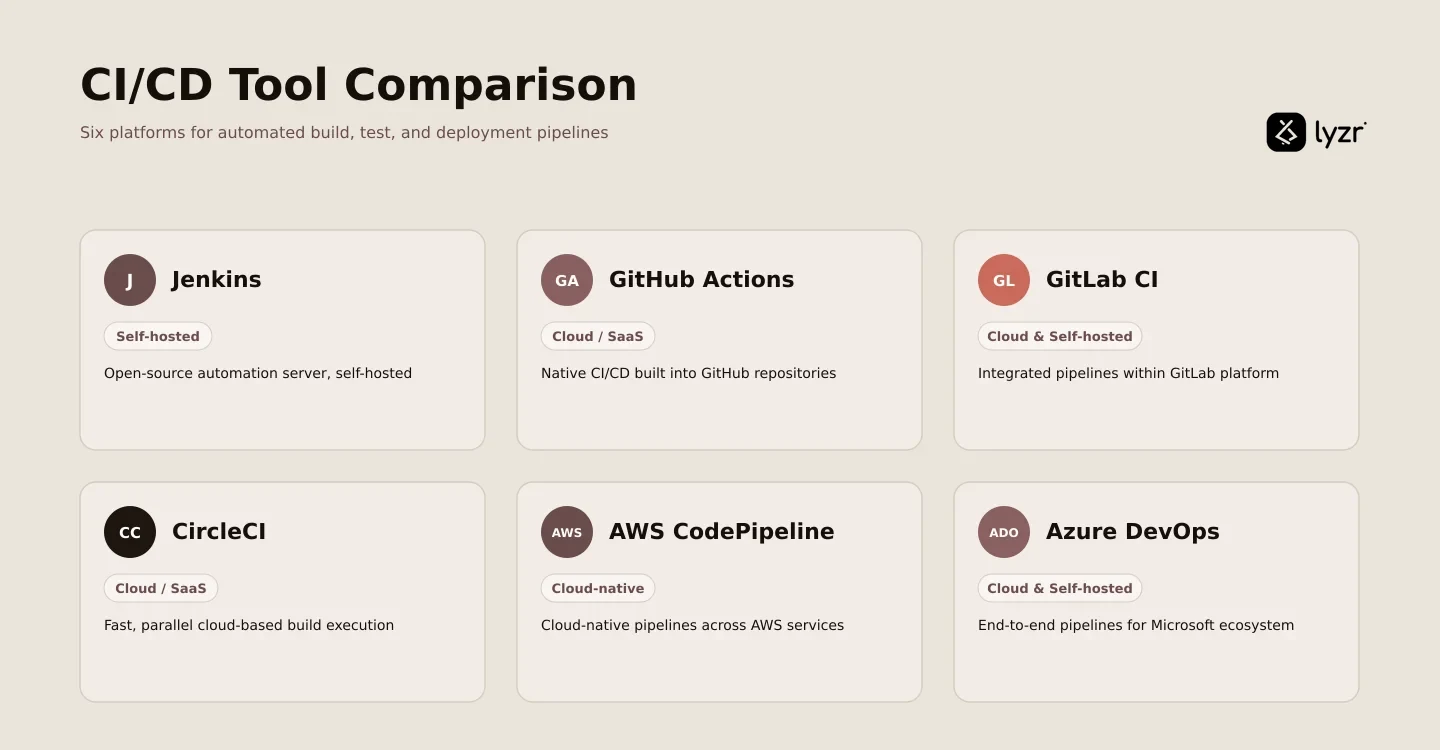
A team running everything on GitHub often reaches for GitHub Actions first, since the triggers and the code already sit in the same place. A team with a large existing Jenkins install keeps running it because rewriting years of pipeline configuration rarely pays for itself. Teams deep in AWS wire CodePipeline directly to CodeBuild and ECS, and organizations standardized on Microsoft tooling do the same with Azure DevOps, which handles source control, pipelines, and work tracking in one product.
Building a pipeline from scratch comes down to three decisions: pick one tool for each component covered above, connect the build server to your version control system so commits actually trigger it, and write down your test and deployment rules in a configuration file, whether that’s a Jenkinsfile or a GitHub Actions YAML workflow, so the rules live in code rather than in someone’s head.
Benefits of a CI/CD pipeline
The benefits trace directly back to the mechanics above, not to automation in the abstract.
Releases get faster and safer because automating CI/CD throughout development, testing, production, and monitoring phases of the software development lifecycle replaces the slow, error-prone manual handoffs that used to happen at each stage boundary. Bugs surface earlier because automated testing allows dependencies and other issues to be identified earlier in the software development lifecycle, saving time later, catching the misaligned button in the test stage instead of in a support ticket. Manual toil drops because the build server, not a person, runs the same checklist every single time, with no variation and no fatigue. Collaboration between dev and ops improves because both teams look at the same pipeline status instead of trading updates over chat, and a CI/CD pipeline allows users and testers to provide almost immediate feedback, and for development teams to act on that feedback just as quickly.
Where AI agents fit into the CI/CD pipeline
A CI/CD pipeline automates mechanics. It does not decide anything. It runs the tests it’s told to run and reports red or green, but it has no opinion on whether this particular test failure is the flaky one that’s failed four times this month for unrelated reasons, or a real regression that should block the release.
That gap is where an engineer usually loses an afternoon: pulling logs, checking whether a failure correlates with a specific commit, deciding whether a performance dip is real or noise, then routing the finding to whoever owns that part of the codebase. None of that work builds the product. It’s the overhead around the pipeline, not the pipeline itself.
This is the specific space where AI agents for DevOps teams are built to operate, not replacing the pipeline’s automation but adding a layer of judgment around it. Rather than a person manually scanning build logs after every failure, an agent can watch pipeline health continuously, triage a failed build by correlating it against recent commits, flag configuration drift before it causes an outage, and route an incident to the right team instead of leaving it in a shared alert channel for someone to eventually notice. The pipeline still runs the build and the test. The agent handles the interpretation and the routing that used to fall on whoever was on call.
That distinction matters because it’s honest about what’s actually changing. The pipeline doesn’t get smarter. The layer watching it does.
If you’re weighing what that looks like for your own build and release process, book a Lyzr Studio demo and walk through it against your current pipeline.
FAQs
What are the four stages of CI CD?
The four core stages are source, build, test, and deploy. A developer commits code to version control (source), the pipeline compiles it into a runnable artifact (build), runs automated checks against that artifact (test), and pushes it to an environment (deploy), with results feeding back into the next commit.
Is CI CD part of DevOps?
Yes. CI/CD is the operational mechanism that puts core DevOps principles, collaboration, automation, and fast feedback, into practice. DevOps describes the culture and goals; the CI/CD pipeline is the concrete, automated workflow that makes those goals achievable on a daily basis rather than staying theoretical.
What’s the difference between DevOps and CI CD?
DevOps is a broader culture and set of practices aimed at breaking down silos between development and operations teams. CI/CD is a specific, automated technical workflow, the pipeline itself, that implements DevOps principles like automation and rapid feedback in a concrete, repeatable form.
What is the difference between CI and CD?
CI, continuous integration, is about developers merging code frequently and validating each merge with an automated build and test. CD, continuous delivery or continuous deployment, picks up from there: delivery keeps validated code always ready for a manual release, while deployment pushes it to production automatically with no approval step.
What are the 7 pillars of DevOps?
There’s no single official standard here; “7 pillars” is a commonly used way to group DevOps practices rather than one fixed, universally agreed list. Versions typically include collaborative culture, continuous integration, continuous testing, continuous delivery, continuous monitoring, infrastructure as code, and a strong focus on measurement and feedback.
Is Jira a CI/CD pipeline?
No. Jira is a project and issue-tracking tool for planning work and managing tickets, not a build, test, or deployment tool. It commonly integrates with actual CI/CD tools like Jenkins or GitHub Actions so that commits and deployments can be linked back to specific tickets for traceability.
Book A Demo: Click Here
Join our Slack: Click Here
Link to our GitHub: Click Here